
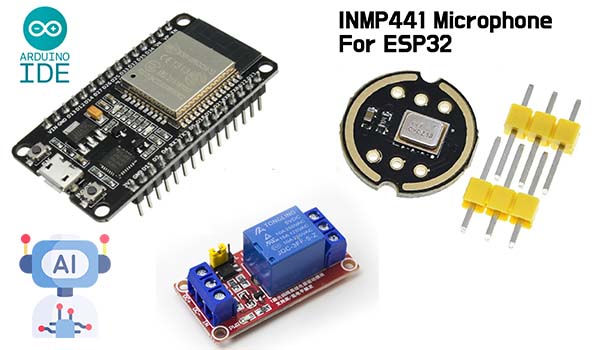
Ever since I got my first ESP32 board, I’ve been obsessed with the idea of building my own smart assistant — something like Alexa or Google Home, but completely offline, DIY, and way more under my control. No cloud processing, no big tech snooping on my commands — just aes tiny, powerful microcontroller listening for voice commands and flipping real-world switches.
It started with a simple idea: What if I could talk to my house and it actually listened? Like, literally say “lights on” and see the lamp click on, no phone, no app — just voice and code.
So I grabbed an ESP32, a microphone module, some relays, and dove head-first into the world of embedded AI. In this project, I’ll walk you through how to build a voice-controlled smart home assistant using nothing but an ESP32, a few common components, and a bit of clever on-device machine learning.
We’re not just talking blinking LEDs here. This is real, usable voice control — trained to recognize your commands, process them locally, and trigger anything from lamps to fans to coffee machines. And the best part? No internet required.
If you’re the kind of person who loves combining wires, code, and a bit of magic to bring your environment to life — you’re in the right place.
What You’ll Need (Parts + Tools)
Before we start connecting wires and writing code, let’s gather the gear. Everything here is relatively low-cost and available from your favorite maker supply shop or online store. I kept it minimal, but you can easily expand on it later.
Core Components
| Component | Description |
|---|---|
| ESP32 Dev Board (Buy it on Amazon) | The brain of our project. Choose one with PSRAM if you have it — more memory helps for AI. |
| INMP441 I2S Microphone (Buy it on Amazon) | A digital mic that connects over I2S. Clean, precise audio input — perfect for voice recognition. |
| Relay Module (1, 2, or 4-channel) | Lets the ESP32 control high-voltage devices like lamps and fans. Go with opto-isolated relays if you can. |
| Breadboard + Jumper Wires | For quick prototyping. Soldering later is totally optional. |
| LEDs (Optional) | Handy for testing your voice commands before connecting real appliances. |
| USB Cable (Micro or USB-C) | For powering and flashing your ESP32. |
Software
- Arduino IDE (with ESP32 board support installed)
- TensorFlow Lite for Microcontrollers (we’ll use the example project as a base)
- Python +
xxdtool (only if you want to build and flash a custom ML model) - Optional: Audacity or similar to record custom voice samples
Why These Choices?
I went with the INMP441 mic because it uses I2S — a digital audio interface that plays nicely with the ESP32. Analog mics can work too, but they’re noisier and require extra filtering. For this kind of voice project, clean input matters a lot.
Relays give us physical control — anything from lights to fans to the coffee maker is fair game. Just be careful when connecting to mains power (more on that later — safety first, always).
Heads-Up
This project works best if you have a quiet environment during command recognition — at least while you’re training and testing. Later, we can work on wake words and noise filtering, but for now, simplicity = better results.
Wiring It All Up: ESP32, Mic, and Relays
Let’s bring the hardware to life. We’ll start by connecting the INMP441 microphone to the ESP32, then wire up one or more relay channels to control whatever device you like — a lamp, fan, or your secret lab’s fog machine. ⚡
Connecting the INMP441 I2S Microphone
The INMP441 is a digital mic that uses the I2S protocol — perfect for feeding audio data directly into TensorFlow Lite models on the ESP32.
Pin Connections
| INMP441 | Connects To ESP32 |
|---|---|
| VCC | 3.3V |
| GND | GND |
| SCK | GPIO 26 |
| WS (LRCL) | GPIO 25 |
| SD | GPIO 33 |
Note: Some ESP32 boards have limited I2S support on specific pins — feel free to adjust the GPIOs in code as needed.
Wiring the Relay Module
Each relay module has IN, VCC, GND, and a relay output terminal (NO, NC, COM).
For now, we’ll just connect one relay to a GPIO pin and control it with a voice command like “yes” or “on.”
Pin Connections
| Relay Module | Connects To ESP32 |
|---|---|
| VCC | 5V (or 3.3V*) |
| GND | GND |
| IN1 | GPIO 17 |
⚠️ Heads-up: Many relays are 5V logic, and ESP32 is 3.3V — if your relay isn’t triggering, try powering the relay from 5V and using a level shifter or transistor for control. Some modules work fine with direct 3.3V signals, but others are picky.
Optional: Add an LED
Before risking a real appliance, connect an LED + resistor to a GPIO (e.g., GPIO 18) to test your control logic.
ESP32 GPIO 18 → 220Ω resistor → LED anode
LED cathode → GND
Wiring Diagram Overview

[INMP441]
   VCC  → 3.3V
   GND  → GND
   SCK  → GPIO 26
   WS   → GPIO 25
   SD   → GPIO 33

[Relay Module]
   VCC  → 5V (or 3.3V)
   GND  → GND
   IN1  → GPIO 17

[ESP32 Dev Board]
   USB  → Power + Programming
Once you’ve got everything wired up, we’re ready to dive into the AI magic: real-time voice recognition on-device.
On-Device Voice Recognition with TensorFlow Lite for Microcontrollers
This is where things get exciting: we’ll turn your ESP32 into a tiny voice-controlled AI assistant, using TensorFlow Lite for Microcontrollers (TFLite Micro) to recognize speech without any internet connection.
We’ll use the “micro_speech” example to detect simple keywords like “yes” and “no”, and then map those to relay controls — turning stuff on and off with just your voice.
How It Works (In Simple Terms)
- The ESP32 listens through the INMP441 microphone.
- Audio is fed into a pre-trained AI model running on the ESP32.
- When you say a keyword (e.g., “yes” or “no”), the model recognizes it.
- The ESP32 triggers a relay based on the recognized command.
It’s real-time, completely offline, and runs on just a few hundred kilobytes of memory.
Setting Up TensorFlow Lite Micro
1. Install Arduino IDE + ESP32 Board Support
Make sure you have the ESP32 package installed via the Boards Manager.
2. Install the TensorFlowLite_ESP32 Library
This is a fork of TensorFlow Lite Micro, ready to run on ESP32:
- Go to Sketch > Include Library > Manage Libraries
- Search for “TensorFlowLite_ESP32” and install it
3. Open the Example
- Go to File > Examples > TensorFlowLite_ESP32 > micro_speech
- This example already includes:
- Pre-trained model for “yes” and “no”
- Audio preprocessing
- Classification and result detection
Test It First
Upload the example to your ESP32 and open the Serial Monitor. Try saying:
- “Yes” → the model should print
yes - “No” → the model should print
no
It may take a couple seconds to respond — that’s normal.
If it works, congrats — your ESP32 just understood human speech without the cloud. 🤯
Control a Relay with Your Voice
Now let’s modify the code so it triggers the relay:
Add This to Setup:
#define RELAY_PIN 17

void setup() {
  Serial.begin(115200);
  pinMode(RELAY_PIN, OUTPUT);
  digitalWrite(RELAY_PIN, LOW); // Start off
  // (Rest of setup...)
}
Add This to the Command Handler:
Find the part of the code that handles recognized commands — it looks like this:
if (strcmp(found_command, "yes") == 0) {
  Serial.println("Turning ON the relay");
  digitalWrite(RELAY_PIN, HIGH);
} else if (strcmp(found_command, "no") == 0) {
  Serial.println("Turning OFF the relay");
  digitalWrite(RELAY_PIN, LOW);
}
Upload the sketch again. Now when you say “yes”, your relay clicks on. Say “no”, it turns off. Simple as that!
Let’s Break Down the Code (Modified micro_speech Example)
Here’s a simplified version of what the main sketch looks like, with key TensorFlow setup and relay control:
#include "tensorflow/lite/micro/micro_interpreter.h"
#include "tensorflow/lite/micro/micro_mutable_op_resolver.h"
#include "tensorflow/lite/schema/schema_generated.h"
#include "tensorflow/lite/version.h"
#include "micro_features/micro_model_settings.h"
#include "micro_features/micro_features_generator.h"
#include "micro_features/micro_speech_model_data.h"
#include "micro_features/micro_speech_features.h"
#include "micro_features/micro_speech_audio_provider.h"
#include "micro_features/micro_speech_command_recognizer.h"

#define RELAY_PIN 17

// Arena for TensorFlow inference
constexpr int kTensorArenaSize = 10 * 1024;
uint8_t tensor_arena[kTensorArenaSize];

tflite::MicroInterpreter* interpreter;
TfLiteTensor* input;
TfLiteTensor* output;

void setup() {
  Serial.begin(115200);
  pinMode(RELAY_PIN, OUTPUT);
  digitalWrite(RELAY_PIN, LOW);

  // Load the model into memory
  const tflite::Model* model = tflite::GetModel(g_micro_speech_model_data);
  if (model->version() != TFLITE_SCHEMA_VERSION) {
    Serial.println("Model schema mismatch!");
    while (1);
  }

  // Set up the operation resolver — which ops this model can use
  static tflite::MicroMutableOpResolver<6> resolver;
  resolver.AddFullyConnected();
  resolver.AddSoftmax();
  resolver.AddReshape();
  resolver.AddDepthwiseConv2D();
  resolver.AddConv2D();
  resolver.AddAveragePool2D();

  // Create the interpreter
  static tflite::MicroInterpreter static_interpreter(model, resolver, tensor_arena, kTensorArenaSize);
  interpreter = &static_interpreter;

  // Allocate memory for the model's tensors
  interpreter->AllocateTensors();

  // Get input and output tensors
  input = interpreter->input(0);
  output = interpreter->output(0);

  // Set up audio
  SetupMicroFeatures();  // sets up the I2S mic and audio buffer
  Serial.println("Setup complete. Say 'yes' or 'no'.");
}

void loop() {
  // Get audio features from the microphone
  bool new_features = GenerateMicroFeatures(input->data.int8);
  if (!new_features) return;

  // Run inference
  TfLiteStatus invoke_status = interpreter->Invoke();
  if (invoke_status != kTfLiteOk) {
    Serial.println("Invoke failed!");
    return;
  }

  // Read prediction scores
  int8_t* scores = output->data.int8;
  int yes_score = scores[0];
  int no_score = scores[1];

  // Interpret scores
  if (yes_score > 50) {
    Serial.println("Command: YES — Turning ON relay");
    digitalWrite(RELAY_PIN, HIGH);
  } else if (no_score > 50) {
    Serial.println("Command: NO — Turning OFF relay");
    digitalWrite(RELAY_PIN, LOW);
  }

  delay(100); // small delay for stability
}
What’s Happening Under the Hood
micro_speech_model_datacontains the pre-trained TensorFlow Lite model (compiled into C array format).GenerateMicroFeatures()grabs audio from the mic, processes it into a spectrogram.interpreter->Invoke()runs the model on that audio data.- The output tensor gives us probabilities for each known keyword.
- If the score for “yes” or “no” crosses a threshold — we act on it.
Test It Live
Upload the code, open Serial Monitor, and say:
- “Yes” — relay turns ON
- “No” — relay turns OFF
You should see debug output like:
Command: YES — Turning ON relay
What’s Next?
The beauty of this setup is that it’s modular. You can:
- Train your own model with words like “fan” or “light”
- Expand to more commands (3+ words)
- Add a wake word like “Jarvis” for more realism
Final Thoughts: Your Voice, Your Assistant, Your Rules
There’s something really satisfying about building a project like this from scratch — not just plugging in a smart speaker, but creating something that listens to you, runs your own code, and doesn’t phone home to some mystery server in the cloud.
With just an ESP32, a mic, a relay, and a bit of TensorFlow magic, you’ve built a fully offline, AI-powered smart home assistant — one that understands your voice and controls your space on your terms.
This is just the beginning.
You can:
- Train more complex commands or add a wake word like “Jarvis”
- Chain multiple relays to automate your whole desk or workshop
- Add feedback with a speaker and text-to-speech
- Expand it into a Home Assistant node over MQTT or ESP-NOW
And best of all? Every part of it is yours — hackable, tweakable, rebuildable.
If you’re like me, you’ll probably already be thinking about the next version. Maybe it answers back. Maybe it greets you by name. Maybe it makes your coffee.
Whatever you build next, just remember: the future isn’t bought — it’s built.
Happy tinkering!
How much work would be involved if I instead of Arduino IDE, I used PlatformIO. I ask this die to Qualcomm’s purchase of Arduino and the new ULA issues. Thanks!
Switching to PlatformIO involves only light setup work—mainly creating a platformio.ini file, adjusting library includes, and letting PlatformIO handle builds, with almost no changes to your actual ESP32 code.