
1. Introduction
When working with IoT projects, you often face a trade-off between local, low-power communication and internet connectivity. What if you could have both—efficient local sensor data transfer and seamless cloud integration—all without draining your batteries?
That’s where the ESP-NOW + Wi-Fi gateway setup comes in.
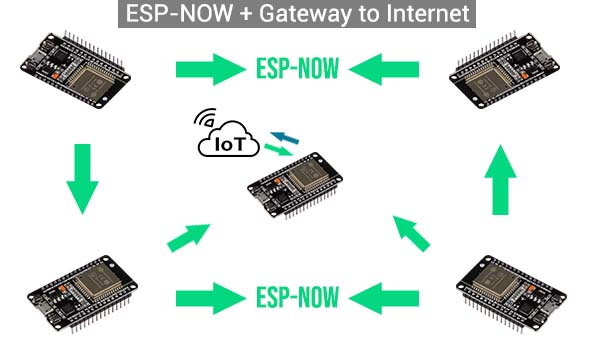
By combining the low-power, peer-to-peer communication of ESP-NOW with the internet capabilities of Wi-Fi, you can create a hybrid system that collects data from multiple ESP32 or ESP8266 nodes and pushes it to the cloud using a single ESP32 gateway.
This kind of setup is perfect for:
- Battery-powered sensors that send data occasionally
- Home automation systems that need to log or react to data remotely
- Smart farming, weather stations, or greenhouse monitors where Wi-Fi isn’t practical at every node
In this tutorial, I’ll show you how to build a simple but powerful ESP-NOW + Wi-Fi gateway system using the ESP32. You’ll learn how to:
- Set up ESP-NOW sensor nodes
- Configure a gateway ESP32 to receive data and upload it over Wi-Fi
- Use MQTT or HTTP to connect to cloud services like ThingSpeak or Home Assistant
Let’s get started!
2. Why Use a Wi-Fi Gateway with ESP-NOW?
After getting comfortable with ESP-NOW (if you haven’t yet, check out my full ESP-NOW guide here), I realized something: it’s amazing for local communication, but what if I wanted that data somewhere I could actually see it—like on my phone, in Home Assistant, or logged to the cloud?
That’s where the Wi-Fi gateway comes into play.
Instead of having every device connect to Wi-Fi and burn through battery just to send a few bytes, you can have:
- One central ESP32 gateway connected to Wi-Fi
- A bunch of low-power sensor nodes using ESP-NOW to send their data locally
- The gateway listens for those messages and relays them to the internet
It’s kind of like having walkie-talkie sensors that whisper to one friend (the gateway), and that friend is the only one using their phone to call the cloud.
Benefits of This Setup
- Power Efficiency: Sensor nodes can wake up, send data quickly via ESP-NOW, then go back to deep sleep. No Wi-Fi handshakes.
- Internet Access: Only the gateway uses Wi-Fi to publish data, reducing congestion and simplifying cloud integration.
- Scalability: Add more sensors without overloading your network. Each node only needs to talk to the gateway.
- Simple Architecture: Clean separation between data collection (ESP-NOW) and data publishing (Wi-Fi).
For me, this hybrid approach hit the sweet spot between efficiency and functionality. You get the lightweight, fast, peer-to-peer style of ESP-NOW, and still have full internet visibility when you need it.
Next up, I’ll walk you through how the system actually works behind the scenes.
3. How the Architecture Works
Before we dive into the code, let’s break down how this whole ESP-NOW + Wi-Fi gateway setup actually works. Once you get the flow, everything else starts to make sense.
Imagine you’ve got a few ESP32 sensor nodes scattered around your home, garden, or workshop. These nodes are running on batteries, maybe waking up every few minutes to read a sensor value—temperature, motion, soil moisture, whatever. Instead of connecting to Wi-Fi and pushing the data out themselves (which drains power fast), they simply send a short ESP-NOW message to a single ESP32 that’s always on and connected to your Wi-Fi network. That’s your gateway.
Here’s the flow in plain English:
- Each sensor node wakes up from deep sleep, reads its sensor, and sends the data via ESP-NOW to the gateway’s MAC address.
- The gateway ESP32, which is running in both ESP-NOW and Wi-Fi modes, listens for incoming ESP-NOW messages.
- When it receives a message, it either:
- Logs the data to the Serial Monitor (for testing)
- Publishes it to an MQTT broker (like Mosquitto or Home Assistant)
- Sends it to a cloud service over HTTP (like ThingSpeak or a custom API)
- The sensor node then goes back to sleep, conserving energy.
The beauty here is that the sensor nodes don’t need Wi-Fi credentials or complicated setups. They just need to know the MAC address of the gateway and the ESP-NOW channel it’s using.
If you’re just getting familiar with ESP-NOW, I recommend checking out this full tutorial first to get comfortable with how the basic communication works between ESP devices. The gateway build is basically just an extension of that.
Next, we’ll go over what hardware you need and how to prepare your Arduino IDE for this setup.
4. Setting Up the Gateway
Let’s get everything prepped before jumping into the code. The setup is pretty straightforward, especially if you’ve already played with ESP-NOW (and if not, this beginner-friendly guide will get you there fast).
What You’ll Need
- At least two ESP32 boards
One will act as a sensor node, the other as the Wi-Fi gateway. You can scale this up later with more nodes. - Arduino IDE installed and configured for ESP32
If you haven’t done this yet:- Go to File > Preferences
- Add this to the “Additional Board Manager URLs”: bashCopiazăEditează
https://raw.githubusercontent.com/espressif/arduino-esp32/gh-pages/package_esp32_index.json - Install the ESP32 package from Tools > Board > Board Manager
- Wi-Fi network access The gateway will need to connect to your Wi-Fi to send data to the internet or your local network. You’ll need:
- SSID and password
- Your router’s channel number (more on that below)
Why Channel Matters
ESP-NOW and Wi-Fi must be on the same channel to work together. This can be one of the trickier parts, but once it’s locked in, you’re good to go.
To make things easier:
- Log into your router and set a fixed channel (e.g., channel 6)
- In your ESP32 code, you’ll manually set this channel with
esp_wifi_set_channel()
If you skip this step, you may run into issues where ESP-NOW packets just vanish into the void because your ESP is hopping channels for Wi-Fi.
Once you’ve got your boards set up, Arduino ready, and your Wi-Fi channel figured out, we’re ready to move on to the code.
5. ESP-NOW Sensor Code (Sender)
This ESP32 sketch is for your sensor node—the device that collects data and sends it to the gateway using ESP-NOW. It’s designed to be as simple and energy-efficient as possible, perfect for battery-powered projects.
This version just sends a dummy value every time it boots up. You can easily replace it with sensor readings later.
Sender Code (ESP-NOW Node)
#include <WiFi.h>
#include <esp_now.h>

uint8_t gatewayMAC[] = {0x24, 0x6F, 0x28, 0xAA, 0xBB, 0xCC}; // Replace with your gateway's MAC

typedef struct message {
  float temperature;  // Example data
  int batteryLevel;
} message;

message dataToSend;

void setup() {
  Serial.begin(115200);

  // Set device as a Wi-Fi Station
  WiFi.mode(WIFI_STA);
  WiFi.disconnect();

  // Init ESP-NOW
  if (esp_now_init() != ESP_OK) {
    Serial.println("ESP-NOW init failed");
    return;
  }

  // Register the gateway as a peer
  esp_now_peer_info_t peerInfo = {};
  memcpy(peerInfo.peer_addr, gatewayMAC, 6);
  peerInfo.channel = 6;  // Make sure this matches your Wi-Fi channel
  peerInfo.encrypt = false;

  if (esp_now_add_peer(&peerInfo) != ESP_OK) {
    Serial.println("Failed to add peer");
    return;
  }

  // Populate data
  dataToSend.temperature = 23.5; // Replace with actual sensor reading
  dataToSend.batteryLevel = 95;

  // Send the data
  esp_err_t result = esp_now_send(gatewayMAC, (uint8_t *)&dataToSend, sizeof(dataToSend));

  if (result == ESP_OK) {
    Serial.println("Data sent successfully");
  } else {
    Serial.println("Error sending the data");
  }

  // Optional: put device into deep sleep
  // esp_deep_sleep(10 * 60 * 1000000); // Sleep for 10 minutes
}

void loop() {
  // Nothing here, this runs once
}
Replace with Real Sensor Data
You can swap the hardcoded values with real sensor readings. For example:
- DHT22 for temperature/humidity
- AnalogRead for battery voltage
- Soil moisture, PIR sensors, etc.
The key idea is this: wake up, send data, go back to sleep.
Once this node is working, you can flash as many ESP32s as you like with similar code, just changing the data or device ID if needed. The gateway will handle incoming messages from any of them.
6. ESP32 Gateway Code (Receiver + Wi-Fi Upload)
The gateway ESP32 plays two roles at once:
- It listens for ESP-NOW messages from your sensor nodes.
- It stays connected to Wi-Fi to push that data to the cloud (or wherever you need it).
In this example, we’ll keep it simple and send the data to ThingSpeak using HTTP. You could easily adapt it for MQTT, InfluxDB, or even a webhook to Home Assistant.
Before you flash this code, make sure you:
- Know your Wi-Fi SSID, password, and channel
- Replace the ThingSpeak API key with your own
Gateway Code (Receiver + Wi-Fi Upload)
#include <WiFi.h>
#include <esp_now.h>
#include <HTTPClient.h>

// Replace with your Wi-Fi credentials
const char* ssid = "Your_SSID";
const char* password = "Your_PASSWORD";
const int wifiChannel = 6; // Must match your ESP-NOW nodes

// ThingSpeak API setup
const char* server = "http://api.thingspeak.com/update";
String apiKey = "YOUR_THINGSPEAK_API_KEY";

typedef struct message {
  float temperature;
  int batteryLevel;
} message;

message incomingData;

void onDataRecv(const uint8_t *mac, const uint8_t *data, int len) {
  memcpy(&incomingData, data, sizeof(incomingData));
  Serial.print("Received temperature: ");
  Serial.println(incomingData.temperature);
  Serial.print("Battery: ");
  Serial.println(incomingData.batteryLevel);

  // Send to ThingSpeak
  if (WiFi.status() == WL_CONNECTED) {
    HTTPClient http;
    String url = server + String("?api_key=") + apiKey +
                 "&field1=" + String(incomingData.temperature) +
                 "&field2=" + String(incomingData.batteryLevel);

    http.begin(url);
    int httpResponseCode = http.GET();
    if (httpResponseCode > 0) {
      Serial.println("Data sent to ThingSpeak");
    } else {
      Serial.print("Error sending data: ");
      Serial.println(httpResponseCode);
    }
    http.end();
  }
}

void setup() {
  Serial.begin(115200);

  // Set to station mode and lock Wi-Fi channel
  WiFi.mode(WIFI_STA);
  esp_wifi_set_promiscuous(true);
  esp_wifi_set_channel(wifiChannel, WIFI_SECOND_CHAN_NONE);
  esp_wifi_set_promiscuous(false);

  WiFi.begin(ssid, password);
  while (WiFi.status() != WL_CONNECTED) {
    delay(500);
    Serial.print(".");
  }
  Serial.println("\nConnected to Wi-Fi");

  // Init ESP-NOW
  if (esp_now_init() != ESP_OK) {
    Serial.println("ESP-NOW init failed!");
    return;
  }

  // Register callback for received data
  esp_now_register_recv_cb(onDataRecv);
}

void loop() {
  // Nothing here, all handled in callback
}
Notes:
- You must lock the Wi-Fi channel using
esp_wifi_set_channel()to keep ESP-NOW and Wi-Fi playing nicely together. - If you’re using MQTT or a local server instead of ThingSpeak, just replace the HTTP section with your preferred method.
- You can support multiple nodes—ESP-NOW will handle messages from any device, as long as they send data to this gateway’s MAC.
7. Common Issues & Tips
Getting ESP-NOW and Wi-Fi to cooperate in the same ESP32 can feel a bit tricky at first—especially when things seem to work almost right. Here are some tips and common pitfalls to help smooth out your experience.
1. ESP-NOW Not Working with Wi-Fi? Check the Channel
This is the number one issue. ESP-NOW and Wi-Fi must be on the same channel, and the ESP32 won’t switch channels automatically when using both.
Tip:
- Log into your router and set a fixed Wi-Fi channel (like channel 6).
- In your gateway code, manually lock the channel with:
esp_wifi_set_channel(6, WIFI_SECOND_CHAN_NONE);
2. Wrong MAC Address
Your sensor nodes need the correct MAC address of the gateway to send data. Even a small typo will break communication.
Tip:
On the gateway, run this once in setup() to print the MAC:
Serial.println(WiFi.macAddress());
Use this value in the sender’s gatewayMAC[] array.
3. Power Supply Issues
Wi-Fi is power-hungry. If you’re using a flaky USB cable or powering your ESP32 from poor sources, it might randomly reset or fail to connect.
Tip:
Always use a solid 5V power supply for the gateway. For battery-powered sensors, make sure your sleep/wake cycle gives the board enough time to boot and transmit.
4. Missed Messages
ESP-NOW is fast but not guaranteed to be 100% reliable out-of-the-box (it’s a fire-and-forget system).
Tips:
- Add retries or simple acknowledgment logic if your data is critical.
- Keep the data packet small and under 250 bytes.
- Try to avoid sending data too quickly in succession.
5. Deep Sleep Reset Confusion
If you’re putting your sensor nodes into deep sleep, make sure you’re re-registering the ESP-NOW peer each time the device wakes up. It doesn’t remember peers after a reset.
6. Testing Without Cloud First
When troubleshooting, skip the Wi-Fi/cloud part and just print to the Serial Monitor first. Once you know the ESP-NOW communication works, then add the HTTP or MQTT upload logic.
This setup takes a little effort to get just right, but once it’s stable, it’s surprisingly robust. I’ve had nodes sending reliable data for days without a hiccup, and battery life is far better than using Wi-Fi alone.
8. Final Thoughts
Combining ESP-NOW with Wi-Fi on the ESP32 gives you the best of both worlds—low-power, local communication from multiple nodes, and cloud connectivity through a single, always-on gateway. It’s one of those setups that feels a bit magical once it clicks.
Whether you’re building a smart garden, home automation network, or just want to push sensor data online without draining every battery in sight, this hybrid approach keeps things efficient, scalable, and flexible.
And the best part? Once you’ve built the basic gateway, you can keep adding more nodes with almost no extra complexity.
If you’re new to ESP-NOW or want to get a better understanding of how it works under the hood, make sure to check out my detailed guide:
ESP-NOW with ESP32 & ESP8266: The Ultimate Guide
It covers the basics, key features, and simple one-to-one examples that this gateway project builds on.
As always, I’d love to hear how you’re using ESP-NOW in your own projects. Drop a comment, share your build, or feel free to ask questions—I’m always happy to help fellow tinkerers.
Happy building, and keep tinkering!
2 thoughts on “ESP-NOW + Wi-Fi Gateway: How to Send ESP32 Sensor Data to the Cloud”